

SHD Support during Entra transition

Jan 15, 2026
503

This guide will outline the procedures for OIT and student help desk teams to collaborate on student account related issues. There is a new version of CountOne currently in development, but is not yet fully functional.
To manage the anticipated influx of support requests received by the student help desk, the SHD will collaborate with designated members of OIT via a Google Chat space to perform account actions in the new Entra system, going live 01/16.
Student Help Desk guidelines:
- Using the current CountOne environment, continue to follow standard SHD procedures to evaluate requests, verify identification, provide guidance, and determine course of action.
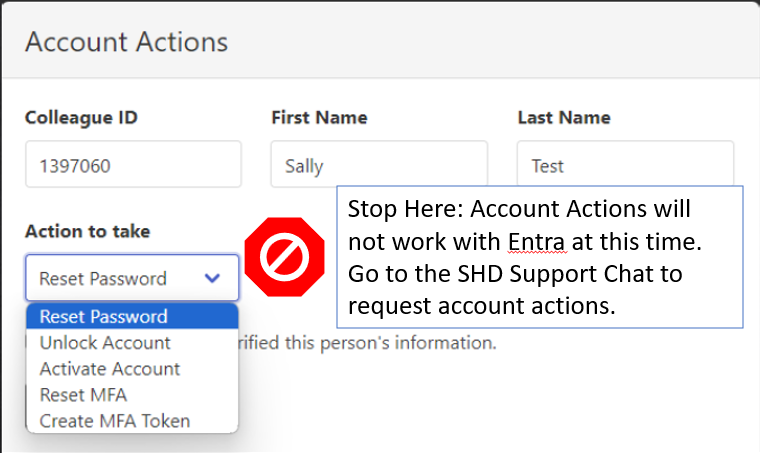
- CountOne should still be used for the purpose of account lookup and identity verification purposes. However, the Account Actions shown below will NOT function with the new Entra login service at this time.
- If after initial troubleshooting, an account action needs to be performed, the SHD rep will open up the SHD Support Chat space to request OIT perform the action.
- The request should include the student's name, ID number, which action is being requested, and the SHD rep's initials if using a departmental account. Example: Requesting MFA Reset for John Smith, 0123456 - RC
- A member of OIT will reply in real-time to claim the request and will reply once more to notify the SHD rep that the action has been performed. SHD team member will then work with the student to ensure resolution and close out request.
OIT Guidelines:
- Designated OIT members should monitor the SHD Support Chat space in Google until further notice. OIT is expected to provide this support until CountOne Win is fully operational and the SHD has the capability to fully service all student requests for support.
- When a request is received from the SHD to perform an account action, the first available OIT agent should reply to the message "claiming" the request. Claiming the request is critical, so that multiple members of OIT are not servicing the same request simultaneously. OIT's goal is to process these requests real-time, as they are requested.
- Once the account action has been performed, reply to the original chat thread letting the SHD rep know the action has been completed.
Example Chat exchange:
- SHD Team Member: Requesting MFA Reset for John Smith, 0123456 - RC
- OIT agent: Received. Working on it.
- OIT agent: MFA reset for John Smith completed. Please have the student try again.

